rss youtube linkedin google+ twitter facebook
Archive | Dynamics GP RSS feed for this section

Dynamics GP 2010 Tips: Word Templates & Enhanced Email

Have you heard the buzz? Microsoft Dynamics GP 2010 has arrived!  Two new features that I find particularly useful are the pre-defined templates in Microsoft Word, and enhanced email capabilities.   Pre-Defined Templates in Microsoft Word     In Microsoft Dynamics GP 2010 you have the ability to work in an environment that we’re all familiar with: […]Read More

Looking for a Sarbanes-Oxley Compliance Tool for Dynamics SL?

My Sarbanes-Oxley compliant clients often ask if there are additional features for reporting and tracking changes to the Microsoft Dynamics SL database by user, date, screen ID, etc.   While Microsoft Dynamics SL does not offer these advanced tracking capabilities out-of-the-box, there is a third party tool, developed by KB Technologies, which allows more robust […]Read More

Clean Up Your Vendor List in Dynamics GP

Is your Dynamics GP vendor list full of old vendors you would like to delete, but can’t because they have a history? Here’s a simple solution.   Temporary Vendors can be deleted much easier than deleting Active Vendors. You will NOT lose transaction history; but the only way you can see the history is in […]Read More

Getting the Most From Microsoft Dynamics CustomerSource?

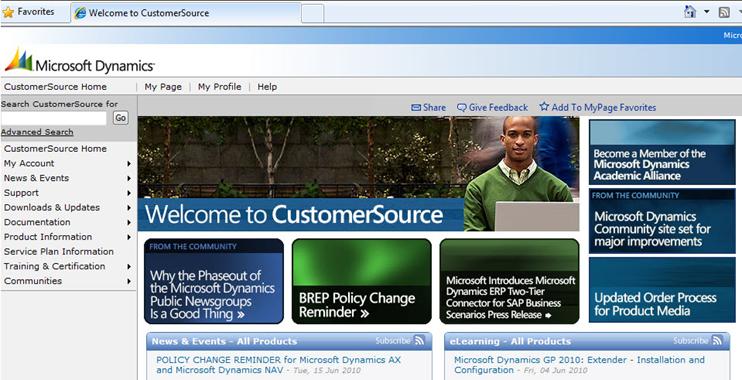
One of the key benefits of having an active Microsoft Support Service Plan is access to CustomerSource. Microsoft Dynamics CustomerSource is an award winning, personalized web site resource to help you optimize your use of Dynamics SL or Dynamics GP. Is your team getting the most from it? Reduce Support Costs with Self-Help Resources CustomerSource […]Read More

Creating a Customized Business Alert in Dynamics GP 10

In last month’s blog I showed you how to activate business alerts in Microsoft Dynamics GP10 (see “Monitor Business Activity with Alert Feature in Dynamics GP“). The next step is to create your own customized business alert by defining an alert formula based on your specific needs. I’ll show you how. But first…a little bonus…here […]Read More

Add Shortcuts to Your Desktop in Dynamics GP 10.0

Shortcuts are a nice convenience and easy to add, yet many users don’t take advantage of the shortcut function in GP 10.0. Let’s walk through the steps of adding a shortcut to your desktop.       There are three areas on your Dynamics GP home screen that you can add shortcuts to. You can […]Read More

Monitor Business Activity with Alerts Feature in Dynamics GP

Do you know that Microsoft Dynamics GP can help you monitor your organization’s data? It can, using the Business Alerts feature.     For example, suppose you want to know when account has exceeded its budget, when customer has exceeded their credit limit, when a new vendor is created, or when your checkbook balance decreases […]Read More

Microsoft Convergence 2010

Microsoft Convergence 2010 takes place April 24 – 27 in Atlanta. If you have not had the experience of attending the biggest annual Microsoft user event, Convergence, I suggest giving it a try.       This year, the event takes place in Atlanta from April 24th through the 27th. It’s big, it’s high-energy, and […]Read More

Convergence 2010 – Planning to Attend?

Convergence is the premier annual Microsoft Dynamics GP, SL and CRM event, bringing customers, partners, team members and industry experts together in an environment created for you to discuss solutions, address business needs and establish a true community that can be leveraged throughout the year. In 2010, Convergence will take place in Atlanta, Georgia on […]Read More

Mail Merge to Microsoft Word with Data from Dynamics GP

Have you ever had needed to create a mailing and wished you could perform a “mail merge” in Microsoft Word with your Dynamics GP data? Well, I’m about to fulfill your wish and outline the basics of the Letter Writing Assistant tool included in Dynamics GP 10.         Under the Reports menu in […]Read More

Selecting, Editing, and Printing 1099′s in Dynamics GP

Printing 1099′s is completely different in GP 10 than in previous versions, leading to many questions from clients. Here’s how it’s done, step-by-step. First step: Verify the 1099 Information. This is done by done by printing the 1099′s to blank paper and reviewing the information. To do this, point to Tools on the Microsoft Dynamics […]Read More

Using Microsoft Dynamics GP to Track W-9 Information for 1099 Vendors

One of the biggest headaches for many accounts payable staff is tracking the receipt of the vendors W-9 form.     The W-9 form, also known as Request for Taxpayer Identification and Certification, is used by entities to verify that they have the correct Taxpayer Identification number for anyone they make a payment to. If […]Read More

Enhanced 1099 Features in Dynamics GP 10.0

It’s that time of year again, and we’re swinging into 1099 season. With the release of Dynamics GP 10, Microsoft has greatly enhanced the processing of 1099 information within Dynamics GP. Have I peaked your curiosity?     This blog will provide you with an overview of the changes included in GP 10 that will […]Read More

Microsoft Dynamics GP Year End Updates and Changes

As the year comes to a close, we are getting a lot of questions about year-end updates and changes for W-2 and 1099-R reporting for Microsoft Dynamics GP. Here is what you need to know. W-2 and W-3 Form Layout Changes The layouts for forms W-2 and W-3 are unchanged, and no new fields have […]Read More

View Payments Applied to All Invoices in Dynamics GP

Sometimes it would be helpful to see a single inquiry screen or report showing all your invoices and the payments applied against those invoices.     Unfortunately, GP does not have such an inquiry screen or report.     However, you can create your own solution using SmartList Builder, a module for Dynamics GP. I’ll […]Read More

Why You Should Name Printers in Dynamics GP

I encourage all my clients to take advantage of the Named Printers feature in Microsoft Dynamics GP – it saves time and reduces errors.   Using Named Printers, your system administrator can assign specific printers to specific: Tasks, Users, or Companies.   Using Named Printers avoids the need to repeatedly choose which printer to use […]Read More

New Reconciliation Tool in GP 10.0 Saves Time

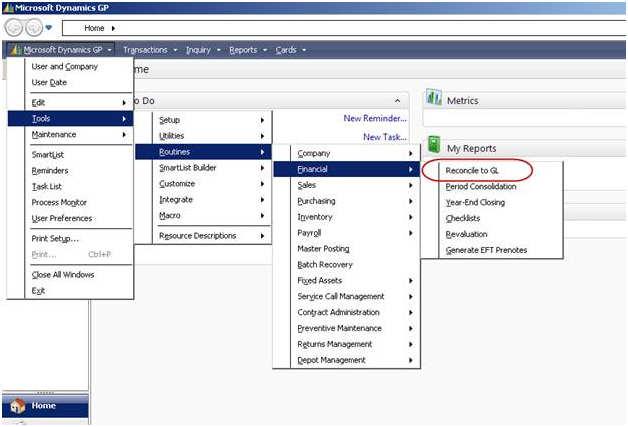
A client was recently struggling to reconcile the General Ledger to the Payables Management module.  Turns out the last time it tied out was nearly twelve months prior. I taught her to use a cool new feature in Microsoft Dynamics GP 10.0 – “Reconcile to GL.”   This  new tool significantly reduces the time  spent reconciling sub-ledgers […]Read More

LeadFormix -->